

This isn’t a “CRMs are bad” article. The big players are genuinely excellent products. But for a small startup, at our stage, they were expensive, and they couldn’t quite show us the one thing we cared about most: a single, stitched-together custom view of a customer’s whole journey. As it turned out, we already had every byte of that data sitting in a database we owned; we just needed some views over it and some bespoke functionality.
“The goal was simple: open a customer, and instantly see their entire story; when they signed up, what they put in their cart and abandoned, what they bought and when, what we emailed them, what they actually watched, and where they dropped off: all on a single pane of glass.” - Lee
The Problem We’re Solving 🎯
Like most startups, we reached the point almost immediately where we needed to understand our customers properly. Who’s stuck? Who bought something and never watched it? Who keeps filling a cart and bailing? Who is struggling and raising support tickets? Who signed up months ago and never spent a penny? Who are our multi-course purchase customers?
So we did the sensible thing and looked at the well-known CRMs. They’re polished, powerful, and clearly built by people who know what they’re doing. But two things stopped us:
- Price at our stage — per-seat, per-month pricing adds up fast for a bootstrapped team, especially when you’re only using a sliver of the feature set. We’d be paying enterprise prices for a fraction of the value.
- The one view we wanted didn’t exist — we didn’t want a generic deal or comms pipeline. We wanted a customer journey timeline: cart abandonment, purchases, emails sent, watch activity, drop-offs, and “never purchased” lists, all interleaved in one chronological story per customer, with a visual map of what has happened and when. Off-the-shelf tools could show pieces of this if we piped data in, but never the stitched-together whole the way we pictured it.
Here’s the interesting thing: we already had all of this data. Every sign-up, payment, email, and playback event was already flowing into a relational database we owned (Amazon DSQL), kept in sync automatically with our primary transactional data in DynamoDB. We weren’t missing data; we were missing views and functionality that would sit on top of it.
"We had an unusual advantage: the data already lived in our account, in a queryable relational store, we already have great AWS Kiro and AI skills, and we are very experienced AWS engineer-architects." - Lee
So the question flipped from “which CRM do we buy?” to “why are we about to pay for a system when we can build one quickly and cheaply?” This article is the answer to that question.
We needed to:
- See a single customer’s full journey in one chronological timeline.
- Run ad-hoc, relational, analytical queries (“show me everyone who bought but never watched”).
- Reuse data we already own rather than re-exporting it to a third party.
- Lock the whole thing down so only our team could ever reach it.
- Keep the bill tiny — this is an internal tool, not a large financial commitment!
Our Example
We’ll discuss the Kno:CRM system we built alongside the Study From Experts platform (ed-tech).
Why did we call it Kno:CRM? Well, this was about 'knowing' our customers, and its a CRM; and I just ran with the name! - Lee
Imagine our small team wants to open up a customer, say, someone who bought one course, watched half of it, and abandoned a cart with two more, and instantly understand their relationship with us. That’s the CRM we’re building.
💡 Note: All code examples are for discussion only and can be further productionised. All screenshots are our development environment too.
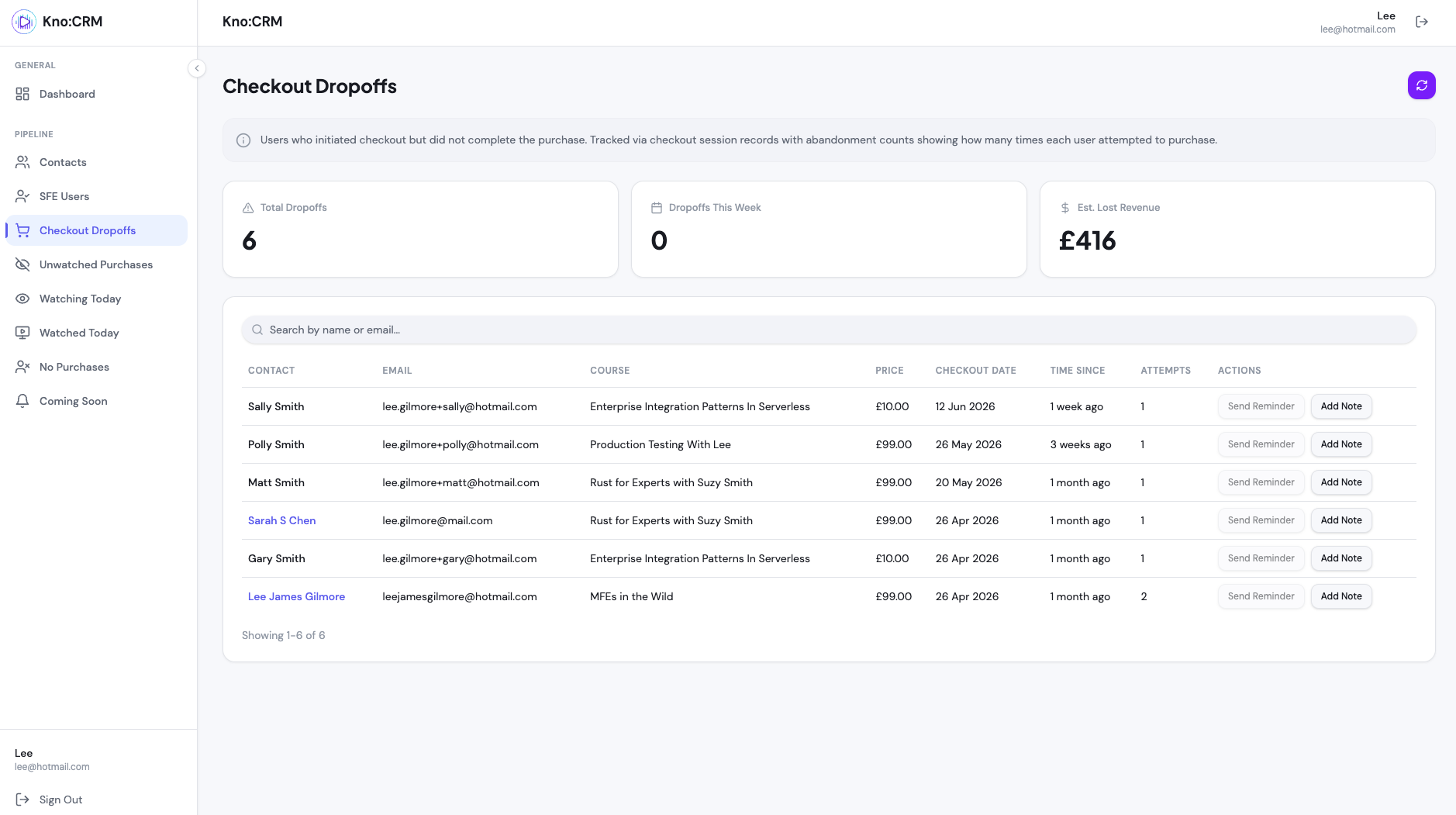
[An example screenshot of the Kro:CRM from our development environment with fake data]
Why Not Just Buy One? 🤔
It’s worth being fair here because the off-the-shelf CRMs are good. Here’s the honest comparison we made for our specific situation:
Consideration | Off-the-shelf CRM | Custom CRM over our own data |
|---|---|---|
Monthly cost | Per-seat, scales with the team | Less than $7 a month for the full team |
Time to set up | Fast — sign up and go | Slower — we build the platform (a week's build) |
Generic sales features | Excellent (deals, automations, integrations) | We only build what we need (and it's truly bespoke) |
Our exact “customer journey” view | Hard to replicate faithfully | Built precisely how we want it |
Data ownership | Data typically leaves our platform | Never leaves our AWS account |
Querying our own data | Limited to their model | Full SQL, any question we want |
The takeaway isn’t “we’re smarter than the CRM companies.” We had an unusual advantage: the data already lived in our account, in a queryable relational store, we already have great AWS Kiro and AI skills, and we are very experienced AWS engineer-architects.
That tilts the build-vs-buy maths heavily toward build.
💡 Build-vs-buy is contextual. The same decision could easily go the other way for a different team. Our deciding factor was that we are experts in AWS, and very experienced architect/engineers who have built up their AI-DLC/AI skills.
The Secret Ingredient: We Already Had the Data and the Skills 🧩
Our primary website runs on DynamoDB. It’s a brilliant fit for the live site: millisecond key-value lookups, predictable performance, and effortless scaling for access patterns like “get this user”, “get this course”, “get this user’s purchases.”
For the things a streaming site does thousands of times a second, it’s ideal.
But DynamoDB is poor at the other kind of question, i.e., the ad-hoc, relational, analytical ones a CRM lives on:
- “Show me every contact who purchased but hasn’t watched anything in the past three months.”
- “Build a chronological timeline of everything that happened to this one customer.”
- “Count users who signed up but never bought, grouped by month, ordered by date descending.”
Those are SQL-like questions. Asking DynamoDB to answer them means table scans and GSI contortions, exactly what you shouldn’t need to do.
So we run two databases, each playing to its strengths, and keep them in sync automatically using change data capture:
- DynamoDB — the source of truth for the live website (fast key-value access)
- Aurora DSQL — a Postgres-compatible store for analytics, reporting, and the CRM (rich SQL)
The bridge between them is Change Data Capture (CDC): every committed write to DynamoDB flows through DynamoDB Streams into a single stream-processor Lambda, which upserts the change into DSQL. The CRM then queries DSQL, never touching the live site’s database.
┌──────────────────────┐
│  Live Website        │   fast key-value reads/writes
│  (DynamoDB)          │◀───────────────────────────────
│  source of truth     │
└──────────┬───────────┘
           │ DynamoDB Streams (NEW_AND_OLD_IMAGES)
           ▼
┌──────────────────────┐
│  Stream Processor    │   one Lambda, CDC
│  (Lambda)            │
└──────────┬───────────┘
           │ upsert committed changes
           ▼
┌───────────────────────┐
│  Aurora DSQL          │   rich SQL for analytics
│  (Postgres-compatible)│   + the CRM
└──────────┬────────────┘
           │ SQL queries
           ▼
┌──────────────────────┐
│  CRM API + UI        │◀───the customer journey view (read-only)
└──────────────────────┘
We get the best of both worlds: DynamoDB stays fast for the site, DSQL answers the hard relational questions for the CRM, and the two are kept consistent without anyone lifting a finger.
💡 We won’t re-explain the CDC mechanics here — the dual-write trap, why we save first and emit second, and how the stream processor works — because we covered it in depth in our EventBridge central event bus and CDC article. This article is about what we built on top of that foundation.
.png)
💡This is event-driven architecture in action! Each component does one thing, communicates via events, and the pipeline flows naturally from upload to playable captioned video.
We call this choreography rather than orchestration, and it is covered in this great course by James Eastham here: https://www.studyfromexperts.com/courses/serverless-integration-patterns/
Architecture Overview 🏗️
The CRM itself is deliberately boring, and boring is good for an internal tool. It’s a thin serverless API in front of DSQL, with a small admin-only UI, all wrapped in a tight security perimeter.
        Our Team Only                    The Kno:CRM                       Our Existing Data

┌─────────────────────────┐                                        ┌───────────────────────┐
│  Team member's browser  │                                        │  Aurora DSQL          │
│  (known office IP)      │                                        │  (Postgres-compatible)│
└──────────┬──────────────┘                                        │  - contacts           │
           │ HTTPS                                                 │  - purchases          │
           ▼                                                       │  - emails_sent        │
┌─────────────────────────┐     ┌────────────────────┐             │  - watch_events       │
│  AWS WAF                │     │  Amazon API        │             │  - cart_events        │
│  - IP allow-list        │────▶│  Gateway           │──┐          └─────────▲─────────────┘
│  - WebACL               │     │  + Admin authoriser│  │                    │
└─────────────────────────┘     └────────────────────┘  │                    │ SQL
                                                        ▼                    │
                                            ┌──────────────────────┐         │
                                            │  Lambda (CRM use     │─────────┘
                                            │  cases)              │
                                            │  - get activity      │
                                            │  - list drop-offs    │
                                            │  - list no-purchases │
                                            │  - list unwatched    │
                                            │  - dashboard metrics │
                                            └──────────────────────┘
The flow is simple:
- A team member opens the CRM from a known office IP.
- AWS WAF checks the request against an IP allow-list before it ever reaches the UI or API. Anyone else is blocked at the edge.
- API Gateway runs the request through an admin authoriser (normal auth — the requester must hold the admin role).
- A Lambda runs the relevant CRM use case, which issues a read-only SQL query against DSQL.
- DSQL returns the rows, and the UI renders the customer journey.
✔️ The CRM only ever reads. It never writes to DynamoDB or DSQL. It’s a window onto data we already own, which keeps it simple and safe.
The Use Case: Fetching a Contact’s Activity ⚙️
Our backend follows a functional, hexagonal style: use cases are plain async functions that orchestrate repositories (no classes, no dependency injection). Fetching a contact’s activity looks like this (simplified and genericised for discussion):
import { getActivityByContactId } from '@repositories/dsql-repository/crm-activity.repository';
import { getContactById } from '@repositories/dsql-repository/crm-contacts.repository';
import { ResourceNotFoundError } from '@errors/resource-not-found-error';
import { logger } from '@shared/logger';

interface GetActivityResult {
  events: ActivityEvent[];
  total: number;
}

export async function crmGetActivityUseCase(
  contactId: string,
  params: { limit: number; offset: number },
): Promise<GetActivityResult> {
  logger.debug('Fetching contact activity', { contactId, params });

  // Make sure the contact actually exists before building their timeline
  const contact = await getContactById(contactId);
  if (!contact) {
    throw new ResourceNotFoundError(`Contact '${contactId}' not found`);
  }

  // get all activity for a contact
  const result = await getActivityByContactId(contactId, params);

  logger.debug('Activity retrieved', {
    contactId,
    count: result.events.length,
    total: result.total,
  });

  return result;
}
A few things worth calling out:
✔️ Just a function. No class, no constructor, no injected dependencies, the use case imports the repository functions it needs directly. Easy to read, easy to test.
✔️ Business logic in the use case, SQL in the repository. The use case decides what should happen (validate the contact, then fetch the timeline); the repository knows how to talk to DSQL. The use case has no idea it’s even Postgres-compatible DSQL underneath.
✔️ Single quotes, single responsibility. It does one thing — return a contact’s activity — and nothing else.
The CRM is essentially a family of these little functions, each answering one question we used to wish the off-the-shelf tool could answer:
Use case | The question it answers |
|---|---|
| “What’s this customer’s whole story?” |
| “Who showed interest then lost momentum?” |
| “Who signed up but never bought?” |
| “Who paid but never pressed play?” |
| “What’s the health of the whole pipeline?” |
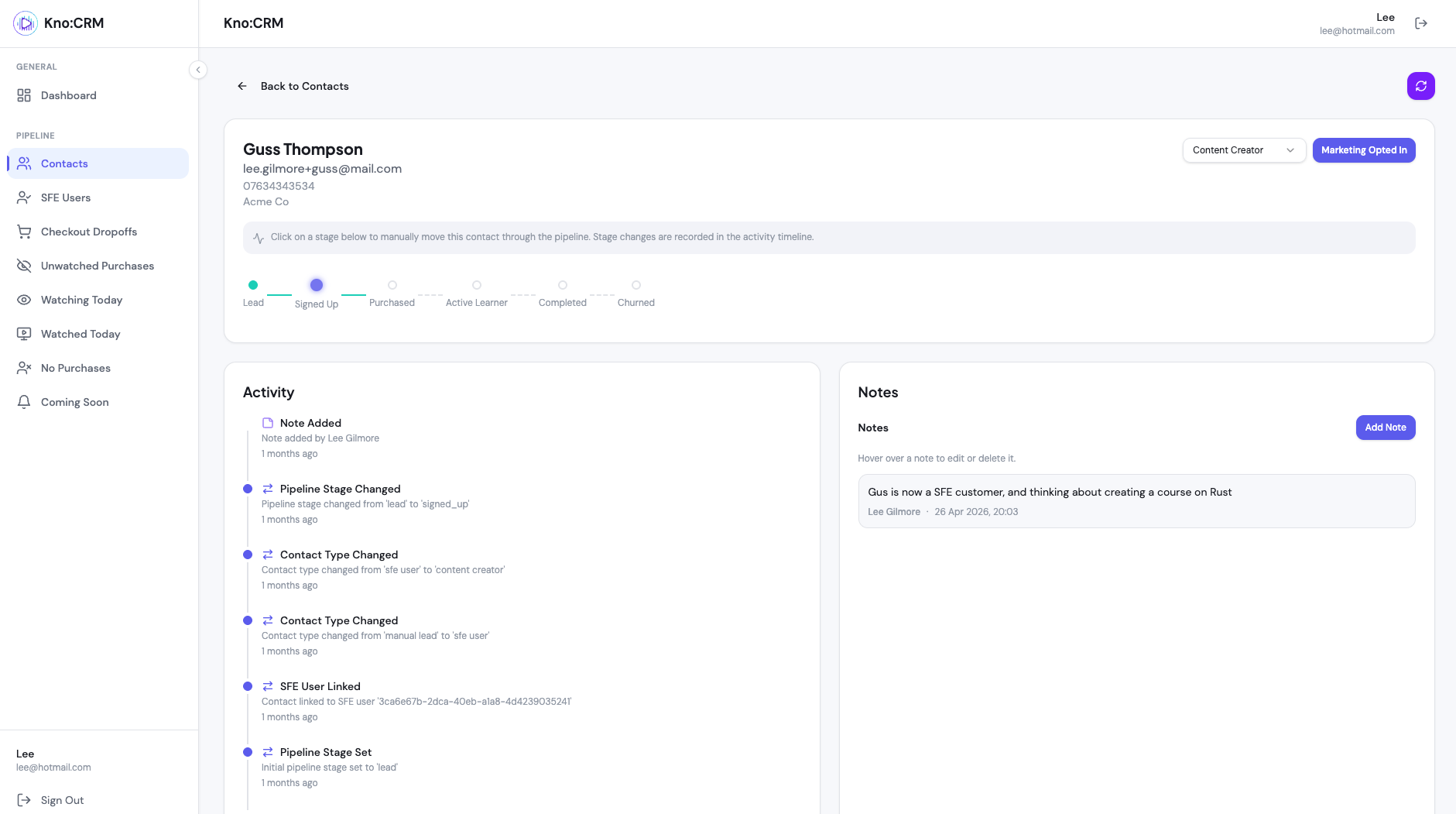
[An example screenshot of the Kro:CRM from our development environment with fake data]
Every one of them is a thin function over a SQL query against data we already have. We then have functionality to contact the customer built on top of this with customised emails.
Locking It Down with WAF and an IP Allow-List 🛡️
A CRM holds your customers’ journeys. It is not something you expose to the open internet, even behind a login. So we layer two independent controls:
- AWS WAF with an IP allow-list — only requests from our team’s known IPs even reach the UI or API. Everyone else is blocked at the edge before any application code runs.
- Normal admin authentication — on top of that, the request still has to carry a valid admin role through API Gateway’s authoriser. (and you can't register as a user for that Cognito UserPool - we only add myself and Mark through the AWS console using the Admin functionality)
This is defence in depth: the WAF is the perimeter fence, the admin auth is the locked door. One is not a replacement for the other, an attacker would need to be both on an allowed network and hold valid admin credentials.
Here’s a genericised CDK snippet showing the WAF WebACL with an IP-set allow-list rule, associated with the CRM API.
import * as wafv2 from 'aws-cdk-lib/aws-wafv2';

// 1. Define the set of IPs allowed to reach the CRM (placeholders only!)
const allowedIps = new wafv2.CfnIPSet(this, 'CrmAllowedIps', {
  name: `${stageName}-crm-allowed-ips`,
  scope: 'REGIONAL', // REGIONAL for API Gateway
  ipAddressVersion: 'IPV4',
  addresses: [
    '1.2.3.4/32', // example office network
    '5.6.7.8/32',
  ],
});

// 2. A WebACL that DEFAULT-BLOCKS, and only ALLOWS the IP set above
const crmWebAcl = new wafv2.CfnWebACL(this, 'CrmWebAcl', {
  name: `${stageName}-crm-web-acl`,
  scope: 'REGIONAL',
  defaultAction: { block: {} }, // block everything by default
  visibilityConfig: {
    cloudWatchMetricsEnabled: true,
    metricName: `${stageName}-crm-web-acl`,
    sampledRequestsEnabled: true,
  },
  rules: [
    {
      name: 'AllowKnownIpsOnly',
      priority: 0,
      action: { allow: {} },
      statement: {
        ipSetReferenceStatement: { arn: allowedIps.attrArn },
      },
      visibilityConfig: {
        cloudWatchMetricsEnabled: true,
        metricName: 'AllowKnownIpsOnly',
        sampledRequestsEnabled: true,
      },
    },
  ],
});

// 3. Associate the WebACL with the CRM API Gateway stage
new wafv2.CfnWebACLAssociation(this, 'CrmWebAclAssociation', {
  resourceArn: crmApiStageArn, // the CRM API Gateway stage ARN
  webAclArn: crmWebAcl.attrArn,
});
✔️ Default block, explicit allow. The WebACL blocks everything and only lets through the named IP set. The safest posture is “deny unless told otherwise.”
✔️ Layered, not either/or. WAF filters by network; the admin authoriser still validates identity. Remove either and the other still stands.
✔️ It’s only an internal tool. Because the audience is our own small team on known networks, an IP allow-list is a perfectly reasonable first gate, it wouldn’t suit a public app, but it’s ideal here.
💡 The honest trade-off: an IP allow-list means someone on the move (a coffee shop, a new home connection) gets blocked until their IP is added. For an internal CRM used by a handful of people, that friction is a feature, not a bug, for our team.
Cost Considerations 💰
This is the part everyone asks about, so let’s be honest rather than flashy. The headline “under $5 to build using AWS Kiro and AI” is true (in fact, perhaps not even $5 on tokens in all honesty, but a rough estimate), but it’s worth seeing what the monthly running cost is, too.
For an internal tool used by a small team, the request volume is tiny, a few hundred page loads a day at most, but the value we get from it is huge. At that scale:
Component | Rough monthly cost | Why |
|---|---|---|
Lambda | Pennies | Internal traffic is low, well within the free tier |
API Gateway | Pennies | A few thousand requests a month is almost nothing - again, free tier |
Aurora DSQL | Pennies (incremental) | Already running for analytics — the CRM just adds a few light read queries |
AWS WAF (WebACL) | ~$6 baseline | A WebACL has a fixed monthly charge regardless of traffic, plus a small per-rule cost (this is a biggest expense). |
Data transfer | Negligible | Tiny JSON responses - nothing. |
CloudWatch Logging | Negligible | Only a small amount of logs created |
Route53 Hosted Zone | Negligible | Static fee of $0.50 per month |
So here’s the honest breakdown: the compute and query side genuinely costs pennies. Lambda, API Gateway, and the incremental DSQL queries barely register. The bulk of the monthly costs is the AWS WAF WebACL, which carries a fixed monthly baseline cost whether anyone uses the CRM or not, plus a small charge per rule and per million requests. After that, a hosted zone at $0.50 per month. In total, probably between $6.50-$7.50 per month.
We think that’s money well spent. We’re paying a few dollars a month primarily for a bespoke CRM around our customers’ data.
✔️ The CRM logic is effectively free. It reuses the DSQL store and CDC pipeline that already existed for reporting.
✔️ The cost is mostly protection, not function. Be clear-eyed: you’re buying a WAF, and getting a CRM thrown in.
✔️ Kiro cost us around $5 to build the CRM in token use - the price of two coffees in the UK (and it was a one off cost)!
💡 If you dropped the WAF and relied on admin auth alone, you’d be looking at pennies a month, but for a tool holding customer journeys, we wouldn’t recommend it. The fixed WAF cost is the price of a sturdy front door.
Compare that to per-seat off-the-shelf pricing that scales with every team member you add, and the maths speaks for itself for our situation.
Wrapping Up 📝
We set out to understand our customers without paying enterprise prices for a fraction of the value, and because we already owned the data, the build won.
The key takeaways:
- Build-vs-buy is contextual. Buying is often right, but if you already own the data and a pipeline to keep it fresh, building can be dramatically cheaper and a better fit.
- Use the right database for the job. Key-value stores for the live site, SQL for analytics, and CDC to keep them in sync, don’t force one tool to do both (we may have gone all in on DSQL from the start, in hindsight, but it was still not fully GA).
- Reuse your pipeline. Our CRM cost almost nothing to build because the CDC sync to DSQL already existed for reporting.
- Keep internal tools simple. A security gate, a Lambda, and a SQL query beat a sprawling platform for an internal need.
When the data is already yours and already queryable, the most expensive part of an internal CRM might just be the lock on the door, and that’s a bill we’re happy to pay.
Further Reading 📚
- EventBridge as the Backbone: Domain Events and CDC on Serverless — the CDC pipeline that feeds the CRM, explained in depth
- Automated Certificate Generation — another consumer of the same event-driven foundation
- Securing Private Video Content with CloudFront Signed URLs — layered security in a different part of the platform
- Event-Driven Closed Captions with Transcribe and MediaConvert — reacting to AWS service events
- Integrating Polar Payments with Event-Driven Serverless — where purchase data originates
- Why Telegram Might Be Better Than Slack for Serverless Notifications — notifying the team about business moments
I hope you found this article useful. If you have any questions or feedback, feel free to reach out!
Ready to level up your AWS skills?
Visit sign-up today and join a community of builders and architects dedicated to mastering the cloud.