
Today, we are covering a common pattern for video streaming platforms, online learning systems, and other applications that need to protect premium content from unauthorised access while still delivering it efficiently via a CDN.
💡 “The goal is simple: ensure only authenticated, authorised users can access your video content, while still benefiting from CloudFront’s global edge network for fast delivery.”
Preface:
✔️ We cover how CloudFront Signed URLs work.
✔️ We cover how this would fit into your serverless workloads to stream video securely.
✔️ We talk through an example in TypeScript and the AWS CDK.
The Problem We’re Solving 🎯
When you store video content in Amazon S3 and serve it through Amazon CloudFront, by default, anyone with the URL can access it. This is fine for public content (maybe public website images), but what about:
✔️ Premium videos that users have paid for?
✔️ Exclusive content for subscribers?
✔️ Training materials for specific organisations?
What we need is a way to:
- Verify the user is authenticated before granting access.
- Validate they have permission to view the specific content (have they paid?).
- Generate time-limited URLs that expire after a set period (to prevent sharing links).
- Support HLS streaming for adaptive bitrate playback (streaming video).
Let’s dive into how we achieve this with Amazon CloudFront signed URLs.
Our Example
In our example, we have a fictitious company called ‘Gilmore Movies and Series’ where a user can sign up and buy individual movies or series episodes.

This means that we need to be able to stream the playable videos in HLS format to the users.
💡 Note: All code examples are for discussion only and can be further productionised.
Architecture Overview 🏗️
The solution consists of several key components (don't worry, we cover all as we go through the article):
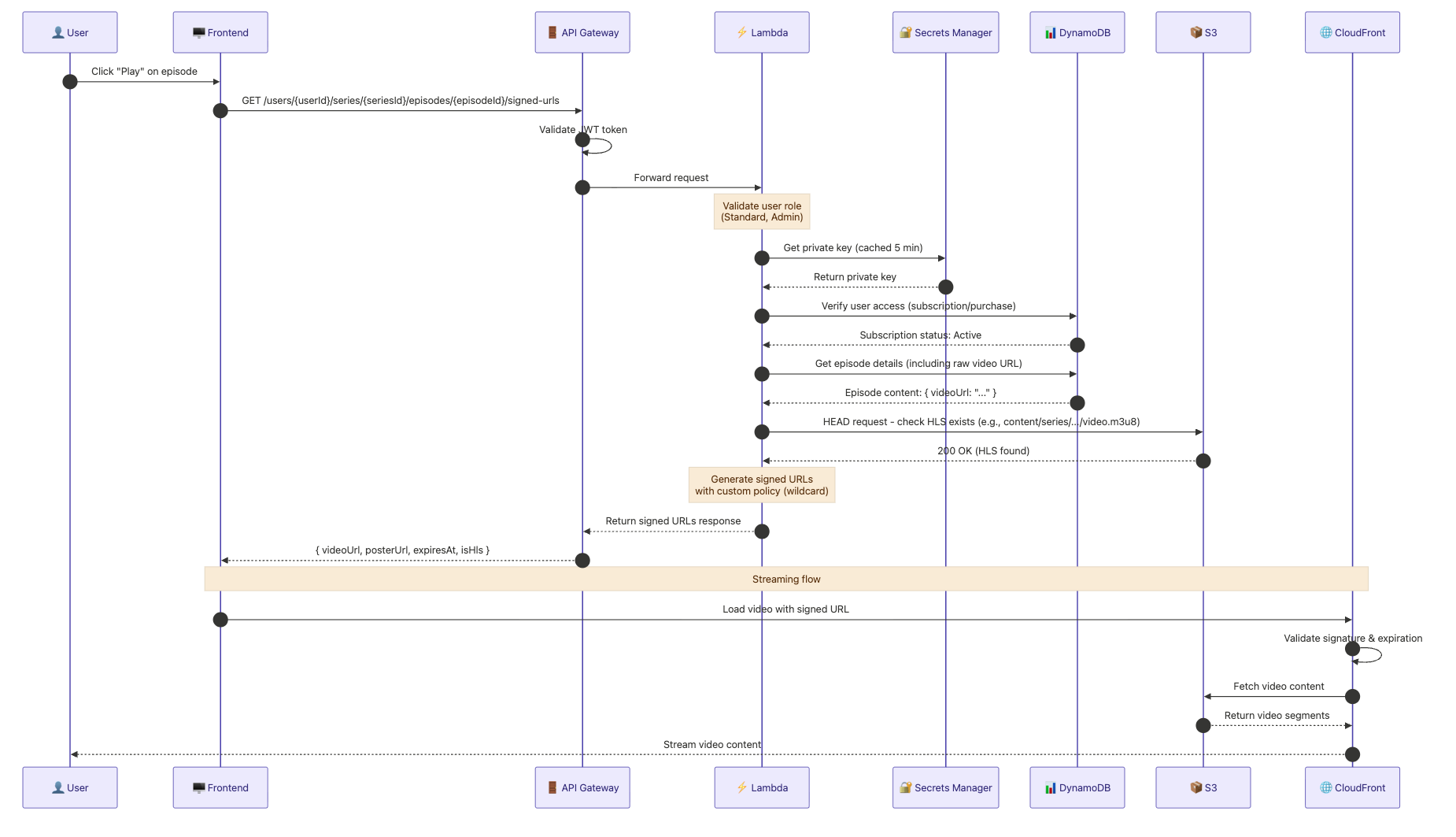
The flow works like this:
- Trigger: User clicks “Play” on an episode in the Frontend.
- Request: Frontend sends a request to API Gateway with User, Series, and Episode IDs.
- Authentication: API Gateway validates the user’s JWT token.
- Authorisation: Lambda verifies the user has the required roles.
- Key Retrieval: Lambda fetches the CloudFront private key from Secrets Manager (cached for 5 minutes).
- Access Check: Lambda verifies in DynamoDB that the user has an active subscription to the series.
- Content Discovery: Lambda retrieves episode metadata and performs an S3 HEAD request to check for HLS content.
- URL Generation: Lambda signs the URLs using a Custom Policy with a wildcard to permit access to all HLS segments.
- Response: API Gateway delivers the signed URLs and expiration data to the Frontend.
- Delivery: Frontend provides the signed URL to the video player, which requests the stream from CloudFront.
- Verification: CloudFront validates the signature and expiration at the edge.
- Streaming: CloudFront retrieves segments from S3 and streams the content to the User.
In the next section, let’s discuss the one-time aspect of creating and setting up the key pairs to make this work per environment (develop, staging and prod).
Setting Up CloudFront Key Pairs 🔐
Before we can sign URLs, we need to create a CloudFront key pair. This is a one-time setup that you’ll do in the AWS Console, typically.
Step 1: Generate an RSA Key Pair Locally
First, generate a 2048-bit RSA key pair in your terminal:
# Generate private key
openssl genrsa -out private_key.pem 2048

# Extract public key
openssl rsa -pubout -in private_key.pem -out public_key.pem
Step 2: Create a Public Key in CloudFront
In the AWS Console:
- Navigate to Amazon CloudFront → Key management → Public keys.
- Click “Create public key”.
- Paste the contents of
public_key.pem(not your private key!). - Note the Key ID — you'll need this later.
Step 3: Create a Key Group
- Navigate to CloudFront → Key management → Key groups.
- Click “Create key group”.
- Add your public key to the group.
- Note the Key Group ID (e.g.,
ca3e2814-da66-4e60-a979-27faebf332dc).
Step 4: Store the Private Key in Secrets Manager
aws secretsmanager create-secret \
  --name "develop-cloudfront-private-key" \
  --secret-string file://private_key.pem \
  --region eu-west-1
⚠️ Security Note: Never commit your private key to source control. Always use Secrets Manager or Parameter Store for sensitive credentials.
For more details on CloudFront key pairs, see the https://docs.aws.amazon.com/AmazonCloudFront/latest/DeveloperGuide/private-content-trusted-signers.html
CDK Infrastructure Setup 🛠️
Now let’s look at how we configure CloudFront to require signed URLs for protected content paths!
Environment Configuration
First, we define our CloudFront configuration per environment for our AWS CDK app:
💡 Note: Here we use my personal approach to app configuration, storing in an app-config file for all stages (develop, staging and prod).
// app-config/app-config.ts
export interface EnvironmentConfig {
  shared: {
    cloudfront: {
      keyGroupId: string;        // The Key Group ID from CloudFront
      publicKeyId: string;       // The Public Key ID
      privateKeySecretArn: string; // ARN of the secret in Secrets Manager
      distributionDomain: string;  // e.g., 'develop.example.com'
      privateKeyPath: string;      // Secret name for retrieval
    };
    // ... other config
  };
}

export const getEnvironmentConfig = (stage: Stage): EnvironmentConfig => {
  switch (stage) {
    case Stage.develop:
      return {
        shared: {
          cloudfront: {
            keyGroupId: 'e23e52a4-ab61-1522-f9e9-27facbf332dc',
            publicKeyId: 'K32NP1AWOI6PI5',
            privateKeySecretArn: 'arn:aws:secretsmanager:eu-west-1:...',
            distributionDomain: 'develop.example.com',
            privateKeyPath: 'develop-cloudfront-private-key',
          },
          // ...
        },
      };
    // ... other environments
  }
};
This app-config approach is detailed in the following article with example repo: https://blog.serverlessadvocate.com/configuring-aws-cdk-apps-across-multiple-environments-f9e0f1158a70
CloudFront Distribution with Signed URL Protection
Next, we have the AWS CDK construct that creates an Amazon CloudFront distribution with signed URL protection for video content:
// app-constructs/web-cloudfront-distribution.ts
import * as cdk from 'aws-cdk-lib';
import * as cloudFront from 'aws-cdk-lib/aws-cloudfront';
import * as origins from 'aws-cdk-lib/aws-cloudfront-origins';
import * as s3 from 'aws-cdk-lib/aws-s3';
import { Construct } from 'constructs';

interface WebCloudFrontDistributionProps {
  stageName: string;
  bucket: s3.Bucket;
  bucketName: string;
  domainCertArn: string;
  /**
   * CloudFront key group ID for signed URL validation.
   * When provided, imports an existing key group for signed URL protection.
   * The key group must be created manually in CloudFront Console.
   */
  cloudFrontKeyGroupId?: string;
}

export class WebCloudFrontDistribution extends Construct {
  public readonly distribution: cloudFront.Distribution;

  constructor(
    scope: Construct,
    id: string,
    props: WebCloudFrontDistributionProps,
  ) {
    super(scope, id);

    // Import existing key group for signed URL validation
    let trustedKeyGroups: cloudFront.IKeyGroup[] | undefined;

    if (props.cloudFrontKeyGroupId) {
      const keyGroup = cloudFront.KeyGroup.fromKeyGroupId(
        this,
        'ImportedVideoKeyGroup',
        props.cloudFrontKeyGroupId,
      );
      trustedKeyGroups = [keyGroup];
    }

    // Create cache policy for video content
    // Exclude query strings from the cache key so signed URL parameters
    // (Expires, Signature, Key-Pair-Id, Policy) don't create unique cache
    // entries per request.
    const videoCachePolicy = new cloudFront.CachePolicy(
      this,
      'VideoCachePolicy',
      {
        minTtl: cdk.Duration.seconds(1),
        defaultTtl: cdk.Duration.days(3),
        maxTtl: cdk.Duration.days(7),
        enableAcceptEncodingGzip: true,
        queryStringBehavior: cloudFront.CacheQueryStringBehavior.none(),
        cookieBehavior: cloudFront.CacheCookieBehavior.none(),
        headerBehavior: cloudFront.CacheHeaderBehavior.none(),
      },
    );

    // Origin request policy forwards signed URL query strings to S3 on
    // cache misses, even though they're excluded from the cache key above.
    const videoOriginRequestPolicy = new cloudFront.OriginRequestPolicy(
      this,
      'VideoOriginRequestPolicy',
      {
        queryStringBehavior: cloudFront.OriginRequestQueryStringBehavior.all(),
        cookieBehavior: cloudFront.OriginRequestCookieBehavior.none(),
        headerBehavior: cloudFront.OriginRequestHeaderBehavior.none(),
      },
    );

    // Create the distribution
    this.distribution = new cloudFront.Distribution(this, id, {
      enabled: true,
      httpVersion: cloudFront.HttpVersion.HTTP3,
      minimumProtocolVersion: cloudFront.SecurityPolicyProtocol.TLS_V1_2_2021,
      defaultBehavior: {
        origin: origins.S3BucketOrigin.withOriginAccessControl(props.bucket),
        viewerProtocolPolicy: cloudFront.ViewerProtocolPolicy.REDIRECT_TO_HTTPS,
        responseHeadersPolicy:
          cloudFront.ResponseHeadersPolicy.SECURITY_HEADERS,
      },
      additionalBehaviors: {
        // Protected video content - requires signed URLs
        ...(trustedKeyGroups && {
          'content/series/*/video/*/*': {
            origin: origins.S3BucketOrigin.withOriginAccessControl(props.bucket),
            viewerProtocolPolicy: cloudFront.ViewerProtocolPolicy.REDIRECT_TO_HTTPS,
            cachePolicy: videoCachePolicy,
            originRequestPolicy: videoOriginRequestPolicy,
            trustedKeyGroups: trustedKeyGroups, // This enforces signed URLs!
          },
        }),
        // HLS manifest files - disable caching for live updates
        // trustedKeyGroups ensures signed URLs are required here too
        '*.m3u8': {
          origin: origins.S3BucketOrigin.withOriginAccessControl(props.bucket),
          cachePolicy: cloudFront.CachePolicy.CACHING_DISABLED,
          originRequestPolicy: videoOriginRequestPolicy,
          ...(trustedKeyGroups && { trustedKeyGroups }),
        },
        // HLS segment files - cache for performance
        // trustedKeyGroups ensures signed URLs are required here too
        '*.ts': {
          origin: origins.S3BucketOrigin.withOriginAccessControl(props.bucket),
          cachePolicy: videoCachePolicy,
          originRequestPolicy: videoOriginRequestPolicy,
          ...(trustedKeyGroups && { trustedKeyGroups }),
        },
      },
    });
  }
}
Let’s break down the key parts:
✔️ Trusted Key Groups: The trustedKeyGroups property tells CloudFront to require signed URLs for this behaviour. Without a valid signature, requests will be rejected with a 403 Forbidden error.
✔️ Path Pattern: The pattern content/series/*/video/*/* matches our video content structure:
content/series/{seriesId}/video/{episodeId}/video.m3u8(HLS playlist)content/series/{seriesId}/video/{episodeId}/segment_001.ts(HLS segments)
✔️ Cache Policy: We exclude all query strings in the cache key because signed URLs use query parameters (Expires, Signature, Key-Pair-Id). This ensures each unique signed URL uses the same cached object (and not its own unique one).
For more on CloudFront behaviours, see Controlling Edge Caching.
The Lambda Function: Generating Signed URLs 🔑
Now let’s look at the Lambda function that generates signed URLs for authenticated users.
The Adapter (Lambda Handler)
import { injectLambdaContext } from '@aws-lambda-powertools/logger/middleware';
import { Metrics, MetricUnit } from '@aws-lambda-powertools/metrics';
import { logMetrics } from '@aws-lambda-powertools/metrics/middleware';
import { getSecret } from '@aws-lambda-powertools/parameters/secrets';
import { Tracer } from '@aws-lambda-powertools/tracer';
import { captureLambdaHandler } from '@aws-lambda-powertools/tracer/middleware';
import { config } from '@config';
import { UserRole } from '@domain/user';
import { ValidationError } from '@errors/validation-error';
import middy from '@middy/core';
import httpErrorHandler from '@middy/http-error-handler';
import { errorHandler, getHeadersFromEvent, logger } from '@shared';
import { validateApiGatewayAuthorization } from '@shared/authorization';
import { generateDeviceFingerprint } from '@shared/device-fingerprint.service';
import { getEpisodeSignedUrlsUseCase } from '@use-cases/series/get-episode-signed-urls.use-case';
import type { APIGatewayProxyEvent, APIGatewayProxyResult } from 'aws-lambda';
import { schema } from './get-episode-signed-urls.schema';

const tracer = new Tracer({});
const metrics = new Metrics({});
const stage = config.get('stage');
const privateKeySecretPath = config.get('privateKeySecretPath');
const cloudFrontDistributionDomain = config.get('cloudFrontDistributionDomain');
const cloudFrontPublicKeyId = config.get('cloudFrontPublicKeyId');

export const getEpisodeSignedUrlsAdapter = async (
  event: APIGatewayProxyEvent,
): Promise<APIGatewayProxyResult> => {
  try {
    const authContext = validateApiGatewayAuthorization(event, [
      UserRole.Standard,
      UserRole.Admin,
      UserRole.ContentCreator,
    ]);

    const { userId, seriesId, episodeId } = event.pathParameters!;

    schema.parse({ userId, seriesId, episodeId });

    const sourceIp = event.requestContext.identity?.sourceIp;
    if (!sourceIp) {
      throw new ValidationError('Unable to determine client IP address');
    }

    const userAgent =
      event.headers['User-Agent'] || event.headers['user-agent'];

    const deviceFingerprint = generateDeviceFingerprint(
      userId,
      sourceIp,
      userAgent,
    );

    const cloudFrontPrivateKey = (await getSecret(privateKeySecretPath, {
      maxAge: 300,
    })) as string;

    if (!cloudFrontPrivateKey) {
      throw new ValidationError('Failed to retrieve CloudFront private key');
    }

    const signedUrls = await getEpisodeSignedUrlsUseCase(
      userId,
      seriesId,
      episodeId,
      deviceFingerprint,
      {
        privateKey: cloudFrontPrivateKey,
        distributionDomain: cloudFrontDistributionDomain,
        publicKeyId: cloudFrontPublicKeyId,
      },
    );

    return {
      statusCode: 200,
      body: JSON.stringify(signedUrls),
      headers: getHeadersFromEvent(stage, event),
    };
  } catch (error) {
    let errorMessage = 'Unknown error';
    if (error instanceof Error) errorMessage = error.message;

    logger.error(errorMessage, { error });
    metrics.addMetric('SignedUrlGenerationError', MetricUnit.Count, 1);

    return errorHandler(error);
  }
};

export const handler = middy(getEpisodeSignedUrlsAdapter)
  .use(injectLambdaContext(logger))
  .use(captureLambdaHandler(tracer))
  .use(logMetrics(metrics))
  .use(httpErrorHandler());
Key points in the adapter:
- Authorisation: We validate the JWT token and ensure the user has the right role and access to the video.
- Device Fingerprinting: We track devices to prevent account sharing (optional but useful). You can store this in Amazon DynamoDB and ensure that they only have a max of three device sessions at any given time.
- Secret Caching: We cache the private key for 5 minutes to reduce Secrets Manager calls using Lambda Powertools Parameters.
The Use Case (Core Logic)
import { randomUUID } from 'node:crypto';
import { HeadObjectCommand, S3Client } from '@aws-sdk/client-s3';
import { config } from '@config';
import { PLAYBACK_SESSION_CONSTANTS } from '@domain/playback-session';
import { DeviceLimitExceededError } from '@errors/device-limit-exceeded-error';
import { ForbiddenError } from '@errors/forbidden-error';
import { CloudFrontSigningService } from '@shared/cloudfront-signing.service';
import { logger } from '@shared/logger';
import { getUserSeriesAccessById } from '@repositories/user-series.repository';
import { getSeriesEpisodeById } from '@repositories/series-episode.repository';
import {
  countActiveSessions,
  getSessionByDevice,
  upsertSession,
} from '@repositories/playback-session.repository';

const s3Client = new S3Client({});
const bucketName = config.get('bucketName');

export interface SignedUrlsResponse {
  videoUrl: string;
  posterUrl?: string;
  expiresAt: string;
  expiresIn: number;
  isHls?: boolean;
  sessionId: string;
}

export interface CloudFrontConfig {
  privateKey: string;
  distributionDomain: string;
  publicKeyId: string;
}

async function checkS3ObjectExists(s3Key: string): Promise<boolean> {
  try {
    await s3Client.send(
      new HeadObjectCommand({
        Bucket: bucketName,
        Key: s3Key,
      }),
    );
    return true;
  } catch {
    return false;
  }
}

async function determineVideoUrl(
  seriesId: string,
  episodeId: string,
  rawVideoUrl: string,
): Promise<string> {
  const hlsPlaylistPath = `content/series/${seriesId}/video/${episodeId}/video.m3u8`;

  const hlsExists = await checkS3ObjectExists(hlsPlaylistPath);

  if (hlsExists) {
    logger.info('HLS playlist found, using HLS for video playback', {
      seriesId,
      episodeId,
    });
    return hlsPlaylistPath;
  }

  logger.info('HLS playlist not found, falling back to raw video', {
    seriesId,
    episodeId,
  });
  return rawVideoUrl;
}

async function validateDeviceLimit(
  userId: string,
  deviceFingerprint: string,
  seriesId: string,
  episodeId: string,
): Promise<{ sessionId: string }> {
  const existingSession = await getSessionByDevice(userId, deviceFingerprint);

  if (existingSession) {
    const now = new Date().toISOString();
    await upsertSession({ ...existingSession, seriesId, episodeId, lastActiveAt: now });
    return { sessionId: existingSession.sessionId };
  }

  const activeSessionCount = await countActiveSessions(userId);

  if (activeSessionCount >= PLAYBACK_SESSION_CONSTANTS.MAX_DEVICES) {
    logger.warn('Device limit exceeded', { userId, activeSessionCount });
    throw new DeviceLimitExceededError();
  }

  const now = new Date().toISOString();
  const sessionId = randomUUID();

  await upsertSession({
    userId,
    sessionId,
    deviceFingerprint,
    seriesId,
    episodeId,
    createdAt: now,
    lastActiveAt: now,
  });

  return { sessionId };
}

export async function getEpisodeSignedUrlsUseCase(
  userId: string,
  seriesId: string,
  episodeId: string,
  deviceFingerprint: string,
  cloudFrontConfig: CloudFrontConfig,
): Promise<SignedUrlsResponse> {
  logger.debug('Getting episode signed URLs', { userId, seriesId, episodeId });

  const access = await getUserSeriesAccessById(userId, seriesId);

  if (
    access.status !== 'Active' &&
    access.status !== 'Completed'
  ) {
    throw new ForbiddenError('User does not have active access to this series');
  }

  const episode = await getSeriesEpisodeById(seriesId, episodeId);

  if (!episode.content.videoUrl) {
    throw new ForbiddenError('Episode does not have video content');
  }

  const { sessionId } = await validateDeviceLimit(
    userId,
    deviceFingerprint,
    seriesId,
    episodeId,
  );

  const signingService = new CloudFrontSigningService({
    keyPairId: cloudFrontConfig.publicKeyId,
    privateKey: cloudFrontConfig.privateKey,
    distributionDomain: cloudFrontConfig.distributionDomain,
  });

  const expirationSeconds = 900;

  const videoPath = await determineVideoUrl(
    seriesId,
    episodeId,
    episode.content.videoUrl,
  );

  const isHls = videoPath.endsWith('.m3u8');

  const videoUrl = await signingService.generateSignedUrl(
    videoPath,
    expirationSeconds,
  );

  let posterUrl: string | undefined;
  if (episode.content.posterUrl) {
    posterUrl = await signingService.generateSignedUrl(
      episode.content.posterUrl,
      expirationSeconds,
    );
  }

  const expiresAt = new Date(Date.now() + expirationSeconds * 1000);

  return {
    videoUrl,
    posterUrl,
    expiresAt: expiresAt.toISOString(),
    expiresIn: expirationSeconds,
    isHls,
    sessionId,
  };
}
The use case handles:
- Authorisation Check: Verifies the user has an active purchase of the video.
- HLS Detection: Checks if HLS content exists, falling back to raw video
- URL Generation: Creates signed URLs for both video and poster image.
The CloudFront Signing Service 🔏
This is where the magic happens, generating cryptographically signed URLs.
// shared/cloudfront-signing.service.ts
import { getSignedUrl } from '@aws-sdk/cloudfront-signer';
import { logger } from './logger';

export interface CloudFrontSigningConfig {
  keyPairId: string;
  privateKey: string;
  distributionDomain: string;
}

export class CloudFrontSigningService {
  private readonly keyPairId: string;
  private readonly privateKey: string;
  private readonly distributionDomain: string;

  constructor(config: CloudFrontSigningConfig) {
    this.keyPairId = config.keyPairId;
    this.privateKey = config.privateKey;
    this.distributionDomain = config.distributionDomain;

    if (!this.keyPairId || !this.privateKey || !this.distributionDomain) {
      const missingVars = [];
      if (!this.keyPairId) missingVars.push('keyPairId');
      if (!this.privateKey) missingVars.push('privateKey');
      if (!this.distributionDomain) missingVars.push('distributionDomain');

      const errorMessage = `Missing required CloudFront configuration: ${missingVars.join(', ')}`;
      logger.error(errorMessage);
      throw new Error(errorMessage);
    }
  }

  private isEpisodeContent(s3Key: string): boolean {
    const seriesPattern = /^content\/series\/[^/]+\/video\/[^/]+\/.+/;
    return seriesPattern.test(s3Key);
  }

  async generateSignedUrl(
    s3Key: string,
    expirationSeconds: number = 900,
  ): Promise<string> {
    try {
      const cleanKey = s3Key.startsWith('/') ? s3Key.substring(1) : s3Key;
      const url = `https://${this.distributionDomain}/${cleanKey}`;

      const expiresAt = new Date(Date.now() + expirationSeconds * 1000);
      const epochTime = Math.floor(expiresAt.getTime() / 1000);

      const isEpisode = this.isEpisodeContent(cleanKey);

      if (isEpisode) {
        const match = cleanKey.match(
          /^(content\/series\/[^/]+\/video\/[^/]+\/)/,
        );

        if (match) {
          const episodeDirectoryPath = match[1];
          const wildcardUrl = `https://${this.distributionDomain}/${episodeDirectoryPath}*`;

          logger.info('Generating signed URL with custom policy for episode', {
            s3Key: cleanKey,
            episodeDirectoryPath,
            wildcardUrl,
            expirationSeconds,
          });

          const signedUrl = getSignedUrl({
            url,
            keyPairId: this.keyPairId,
            privateKey: this.privateKey,
            policy: JSON.stringify({
              Statement: [
                {
                  Resource: wildcardUrl,
                  Condition: {
                    DateLessThan: {
                      'AWS:EpochTime': epochTime,
                    },
                  },
                },
              ],
            }),
          });

          return signedUrl;
        }
      }

      logger.debug('Generating signed URL with canned policy', {
        s3Key: cleanKey,
        expirationSeconds,
      });

      const signedUrl = getSignedUrl({
        url,
        keyPairId: this.keyPairId,
        privateKey: this.privateKey,
        dateLessThan: expiresAt.toISOString(),
      });

      return signedUrl;
    } catch (error) {
      const errorMessage =
        error instanceof Error ? error.message : 'Unknown error';
      logger.error('Failed to generate signed URL', {
        s3Key,
        error: errorMessage,
      });
      throw new Error(`Failed to generate signed URL: ${errorMessage}`);
    }
  }
}
Canned vs Custom Policies
OK, so Amazon CloudFront supports two types of signed URLs that we can use:
Canned Policy (simpler):
- Signs a specific URL.
- Only supports expiration time.
- Shorter URL (signature is smaller).
// Canned policy example
const signedUrl = getSignedUrl({
  url: 'https://cdn.example.com/video.mp4',
  keyPairId: 'K12NL2BC1I6PL5',
  privateKey: privateKey,
  dateLessThan: '2024-12-31T23:59:59Z',
});
Custom Policy (more flexible):
- Supports wildcards in the resource URL.
- Can include IP address restrictions.
- Can specify start time (not just expiration).
- Longer URL (full policy is encoded).
// Custom policy with wildcard for HLS streaming in a Series context
const signedUrl = getSignedUrl({
  url: 'https://cdn.example.com/series/stranger-things/episode-1/video.m3u8',
  keyPairId: 'K12NL2BC1I6PL5',
  privateKey: privateKey,
  policy: JSON.stringify({
    Statement: [{
      // The Wildcard allows access to the playlist (.m3u8) AND all segments (.ts)
      Resource: 'https://cdn.example.com/series/stranger-things/episode-1/*',
      Condition: {
        DateLessThan: { 'AWS:EpochTime': 1735689599 }, // Expiration timestamp
        // Optional: Ensure the request comes from the user's specific IP
        // IpAddress: { 'AWS:SourceIp': '1.2.3.4/32' },
      },
    }],
  }),
});
For HLS streaming, we must use custom policies with wildcards because:
- The
.m3u8playlist references multiple.tssegment files. - Each segment would need its own signed URL without wildcards.
- Wildcard allows access to all files in the module directory.
See Using Signed URLs in the AWS documentation for more details.
Putting It All Together 🎬
Here’s the complete flow when a user requests to watch a video:
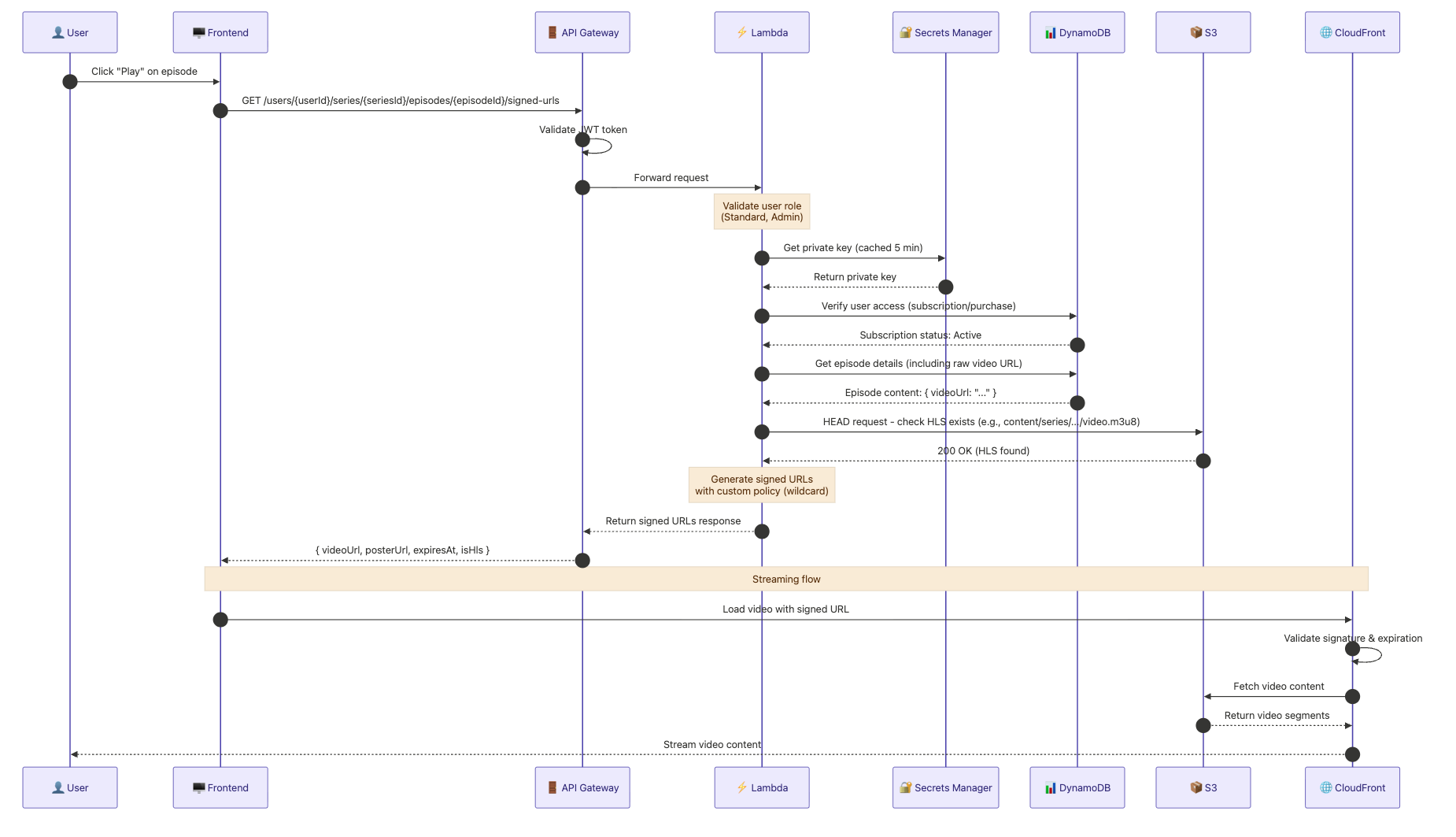
The response from the Lambda function looks like this:
{
  "videoUrl": "https://cdn.example.com/content/videos/.../video.m3u8?Policy=...&Signature=...&Key-Pair-Id=...",
  "posterUrl": "https://cdn.example.com/content/videos/.../poster.jpg?...",
  "expiresAt": "2024-01-15T15:30:00Z",
  "expiresIn": 900, // 15 minutes
  "isHls": true,
  "sessionId": "04b6395c-abec-4c08-a09c-547feb5169bc"
}
Security Considerations 🛡️
Before we close, a few important security points to keep in mind:
1. Private Key Protection
- Store private keys in Secrets Manager, never in code!
- Use IAM policies to restrict access to the secret.
- Rotate keys periodically (see Key Rotation below).
2. URL Expiration
- Keep expiration times short — 15 minutes is a good default for on-demand video with shorter episodes.
- Shorter times reduce the window for URL sharing if a signed URL is leaked.
- Implement a heartbeat mechanism so the client can refresh URLs before they expire.
- For live streaming, you may need longer TTLs depending on your segment duration.
3. Key Rotation
CloudFront key groups support multiple public keys, which enables zero-downtime rotation:
- Generate a new RSA key pair.
- Add the new public key to the existing key group (both old and new are now valid).
- Update Secrets Manager with the new private key.
- Wait for all cached signed URLs using the old key to expire.
- Remove the old public key from the key group.
This ensures no interruption to active viewers during rotation.
4. IP Restrictions (Use with Caution)
You can add IP restrictions to custom policies, which means the URL can only be used by that person's IP:
policy: JSON.stringify({
  Statement: [{
    Resource: wildcardUrl,
    Condition: {
      DateLessThan: { 'AWS:EpochTime': epochTime },
      IpAddress: { 'AWS:SourceIp': `${clientIp}/32` },
    },
  }],
}),
⚠️ Caveat: IP restriction can break legitimate playback for a meaningful percentage of users. Mobile users frequently change IPs (mobile phone internet handoffs, WiFi-to-mobile data transitions), and users behind corporate proxies or VPNs may have a different egress IP for the API call vs. the CloudFront request. You could perhaps consider making IP restriction optional or using it only in high-security environments, again as always, its all tradeoffs people!
5. Device Limiting
Track active sessions to prevent account sharing. Include the User-Agent alongside the IP for a more robust fingerprint:
// Generate deterministic fingerprint from userId + IP + User-Agent
export function generateDeviceFingerprint(
  userId: string,
  sourceIp: string,
  userAgent?: string,
): string {
  const fingerprintInput = userAgent
    ? `${userId}:${sourceIp}:${userAgent}`
    : `${userId}:${sourceIp}`;
  const hash = createHash('sha256');
  hash.update(fingerprintInput);
  return hash.digest('hex');
}
This allows you to enforce a maximum number of concurrent devices (e.g., 3) by tracking playback sessions in DynamoDB with TTL for automatic cleanup. You can then throw an error if a user tries to play back on more than 3 devices, giving them say 10 minutes to try again after logging off one of the devices.
Conclusion 🏆
As a final recap, we covered:
✔️ How CloudFront Signed URLs work.
✔️ How this would fit into your serverless workloads to stream video securely.
✔️ We talked through an example in TypeScript and the AWS CDK.
Wrapping up 👋🏽
I hope you enjoyed this short article, and if you did, then please feel free to share and provide feedback!
Ready to level up your AWS skills?
Visit sign-up today and join a community of builders and architects dedicated to mastering the cloud.